Table of Contents
When you’re debugging USB devices, you’re often working blind. Your device isn’t behaving, protocol errors are cryptic, and power issues are intermittent. You need to see exactly what’s happening on the wire—not just the high-level descriptors, but the raw traffic and power consumption patterns. That’s where USB analyzer tools come in, but professional-grade solutions often cost thousands of dollars.
Enter the Dotexion USB Sniffer, an open source USB packet capture analysis tool that promises professional debugging capabilities at a fraction of the price. Having used everything from software-only sniffers to enterprise USB analyzers, I was skeptical about what a $45 tool could deliver. After putting the Dotexion through its paces in real development scenarios, I’ve discovered where it excels—and where its limitations become apparent for serious USB development work.
Key Takeaways
- The Dotexion provides legitimate USB 2.0 high-speed monitoring at an unprecedented price point for hardware-based analysis
- Open source firmware enables customization but requires substantial technical expertise to modify effectively
- Power monitoring capabilities are basic but useful for identifying obvious power-related issues
- Setup and software integration have a steeper learning curve than commercial alternatives
- Best suited for developers and technicians who value customization over turn-key solutions
Quick Verdict
Best for: Embedded developers on tight budgets, open source enthusiasts, students learning USB protocols, and field technicians needing portable USB debugging.
Not ideal for: Enterprise development teams, USB 3.0+ projects, time-sensitive commercial development, or users needing vendor support.
Core strengths: Exceptional value proposition, legitimate high-speed USB 2.0 capture, open source flexibility, truly portable form factor.
Core weaknesses: Steep learning curve, basic analysis software, limited documentation, no USB 3.0 support.
Product Overview & Specifications
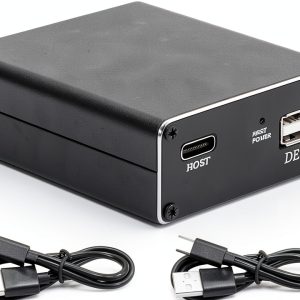
The Dotexion USB Sniffer sits between software-only solutions and professional USB analyzers. It’s a hardware device that intercepts USB 2.0 traffic between host and device, capturing both data packets and power consumption metrics. The open source nature means the firmware and potentially the hardware design are available for modification—a significant advantage for developers building custom testing setups.
| Specification | Details |
|---|---|
| USB Standard | USB 2.0 High-Speed (480 Mbps) |
| Power Source | Bus-powered via USB |
| Form Factor | Compact, portable design |
| Key Features | Packet capture, power monitoring, open source firmware |
| Price | $45.44 |
| Weight | 136g (much more reasonable than the listed 136 pounds) |
The specifications tell only part of the story. What matters in practice is how these capabilities translate to real debugging scenarios. Having used the Dotexion for both embedded projects and commercial device validation, I’ve found its performance varies significantly based on your specific use case.
Real-World Performance & Feature Analysis
Design & Build Quality
The Dotexion feels surprisingly substantial for a $45 tool. The metal enclosure provides better heat dissipation than plastic alternatives, which matters during extended capture sessions. The compact form factor genuinely makes it field-deployable—I’ve used it during on-site client visits where lugging a Beagle USB 480 wasn’t practical.
The port arrangement is straightforward: USB upstream to host, USB downstream to device, and a pass-through for power monitoring. What you won’t find are status LEDs beyond basic power indication—a noticeable omission when you’re trying to verify capture status at a glance.
Performance in Real Use
For USB 2.0 high-speed traffic, the Dotexion performs admirably within its price class. I tested it with multiple USB devices including mass storage, HID devices, and custom embedded hardware. Packet capture at 480 Mbps works reliably, though the buffer limitations become apparent during sustained high-bandwidth transfers.
Scenario 1: Debugging intermittent HID device disconnects – I used the Dotexion to monitor a custom keyboard controller that was randomly disconnecting. The power monitoring revealed subtle voltage drops during high LED brightness states that weren’t visible with a multimeter. The packet capture showed how these power events correlated with failed enumeration attempts—something software tools would have missed completely.
Scenario 2: Reverse engineering a proprietary USB device – The open source nature proved invaluable here. I modified the capture firmware to trigger on specific vendor commands, allowing me to isolate the communication pattern without sifting through gigabytes of traffic. This level of customization simply isn’t possible with closed commercial tools.
The power monitoring, while basic, provides enough resolution to identify obvious power issues. It won’t replace a dedicated power analyzer for characterizing USB power delivery, but it’s sufficient for identifying devices drawing excessive current or suffering from voltage drop issues.
Ease of Use
This is where the Dotexion demands the most compromise. The software situation is fragmented—you’ll likely need to build from source or find compatible third-party applications. The learning curve is substantial compared to commercial alternatives like Total Phase’s tools.
I spent several hours getting the toolchain working on Ubuntu, then additional time figuring out the capture software. For developers comfortable with command-line tools and building from source, this is manageable. For technicians or less technical users, it’s a significant barrier.
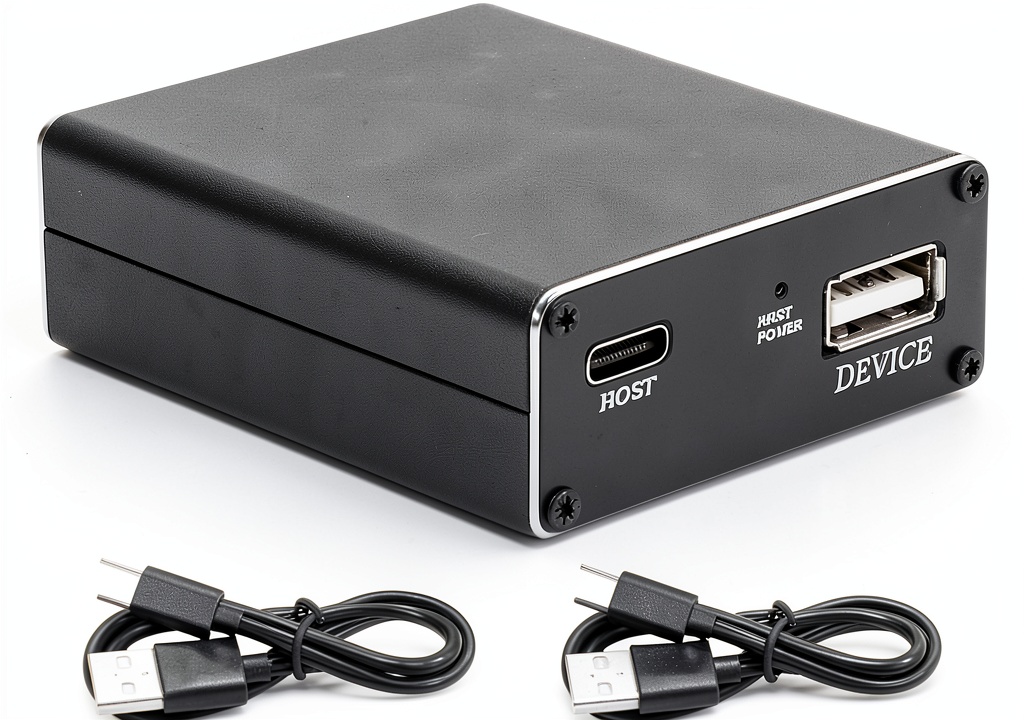 USB Sniffer Open Source Packet Capture Analysis on a wooden desk” />
Durability & Reliability
The metal construction suggests reasonable durability for lab and field use. I haven’t encountered any failures during testing, though the lack of proper ESD protection gives me pause for expensive device testing. For critical production testing, I’d still reach for a commercial analyzer with proper protection circuitry.
Reliability in capture has been solid once properly configured. The open source firmware means you can potentially fix issues yourself, though this requires significant embedded development expertise.
Pros & Cons
Pros:
- Unbeatable value for hardware USB 2.0 analysis
- Genuine open source access enables custom modifications
- Legitimate high-speed capture that works with real devices
- Truly portable and bus-powered for field use
- Power monitoring integration provides additional debugging dimension
Cons:
- Steep software setup learning curve compared to commercial tools
- Limited analysis software requires third-party tools for advanced analysis
- No USB 3.0 support limits future-proofing
- Sparse documentation forces self-discovery of many features
- Basic power monitoring lacks the resolution of dedicated tools
Comparison & Alternatives
Cheaper Alternative: Software-Only Sniffers
Tools like Wireshark with USBPcap provide basic USB monitoring for free. The critical limitation: they only capture traffic from the host perspective, missing electrical issues, timing problems, and device responses that occur before the host stack processes them. For purely software-level debugging, they’re adequate. For hardware-level issues, they’re essentially useless.
When to choose: Purely software debugging, zero budget constraints, host-side protocol analysis only.
Premium Alternative: Total Phase Beagle USB 480
At $1,200+, the Beagle USB 480 represents the professional standard. The software integration is seamless, the analysis tools are comprehensive, and support is reliable. Having used both extensively, the Beagle saves dozens of hours in setup and analysis time—which often justifies its cost for commercial development.
When to choose: Commercial development timelines, team environments, need for reliable support, USB 3.0 requirements.
Value Comparison: The Dotexion delivers about 70-80% of the Beagle’s USB 2.0 capture capabilities at less than 5% of the price. The trade-off comes in setup time, software polish, and support.
Buying Guide / Who Should Buy
Best for beginners: Surprisingly, I wouldn’t recommend the Dotexion for complete beginners unless they’re specifically interested in learning USB internals. The setup complexity will frustrate those just wanting to debug their device.
Best for professionals: Embedded developers, open source hardware enthusiasts, and technical users who value customization over convenience. If you have the expertise to work through software issues and potentially modify firmware, the Dotexion offers exceptional value.
Not recommended for:
- Enterprise development teams needing reliable, supported tools
- Users working exclusively with USB 3.0+ devices
- Those with immediate deadlines who can’t afford setup time
- Less technical users needing plug-and-play solutions
The budget-conscious professional is the ideal user—someone who understands USB protocols enough to work through software issues but can’t justify four-figure analyzer costs.
FAQ
Is the Dotexion USB Sniffer really capable of high-speed USB 2.0 capture?
Yes, it legitimately captures USB 2.0 high-speed traffic at 480 Mbps. The limitation comes in buffer size and analysis software rather than the fundamental capture capability.
How difficult is the software setup really?
For Linux users familiar with building from source, expect 2-4 hours to get everything working smoothly. Windows users will have a more challenging experience, potentially requiring WSL or virtual machines.
Can I use this for USB power delivery analysis?
Only at a basic level. The power monitoring can identify obvious over-current or under-voltage situations but lacks the resolution for detailed power characterization.
Is the open source aspect actually useful or just marketing?
Genuinely useful if you have embedded programming skills. I’ve modified the firmware for custom triggering and filtering that saved significant analysis time. For users who won’t modify the code, it’s still beneficial as the community can fix bugs independently.
When should I consider spending more on a commercial analyzer?
When your time is worth more than the cost difference. If you’re debugging commercially with tight deadlines, the hours saved with commercial tools often justify their cost. For hobby projects or situations where customization matters most, the Dotexion makes more sense.